 Editorify
How to delete or edit existing reviews?
How to delete reviews from Editorify?
Reviews cannot be edited after they are imported. You can hide a review so it no longer shows on your store, or delete it, from the Import list in the Editorify dashboard. You can delete all the reviews of a product at once or only the ones you select. This applies on every plan and platform.
Delete reviews
Log in to the Editorify dashboard.
Click "Import list" in the side menu.
To delete all the reviews of a product, find the product and click the recycle-bin icon.
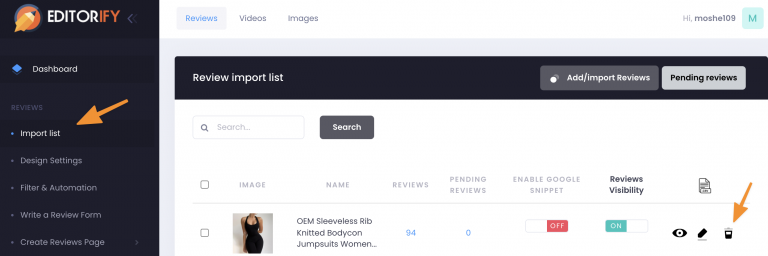
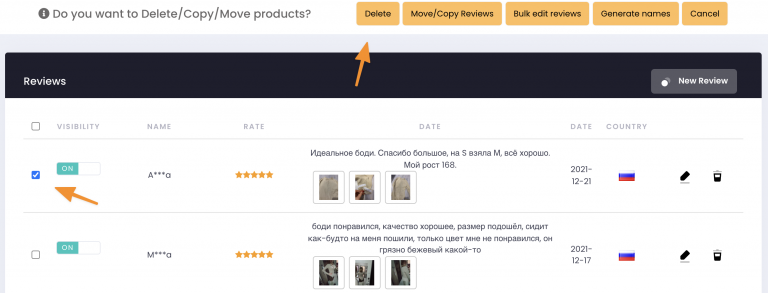
To delete only some reviews, click the product's Edit icon (pencil), select the reviews you want to remove and click "Delete".
Hide reviews instead of deleting them
If you may want a review back later, hide it instead by turning its visibility off in the Editorify dashboard. A hidden review stays in your dashboard but does not show on your store.
To hide many reviews by rule rather than one by one, use the star filter and keyword blacklist. For example, show only 4- and 5-star reviews, or hide every review that contains the supplier's name.
Why reviews cannot be edited
An imported review is the review as written on the supplier's listing, and it stays that way. If a review has a spelling mistake, a wrong language or content you do not want, hide it or delete it. Older versions of this guide described editing a review's text, name or date; that option no longer exists.
Reviews from your own customers work the same way. If you want to check them before they appear, turn off "Automatically approve new reviews"; see how to approve new reviews manually.
FAQ
Can I fix a typo in an imported review?
No. Hide or delete the review. If you import from a site in another language, translate before you import.
Can I get a deleted review back?
Import it again from the supplier's page. Use hiding if you might want the review later.
How do I remove imported videos?
Still stuck? Contact support or email support@editorify.com.