 Editorify
How to copy reviews from one product to multiple products?
How to copy reviews
On this page
You can copy or move reviews from one product to another product, or to several products at once, from the Import list in the Editorify dashboard. You can also send reviews to several products while importing them, with the "Multiple product" option in the Editorify Chrome extension. This works on Shopify, Wix, WooCommerce and BigCommerce.
Copy or move reviews you already imported
Log in to the Editorify dashboard.
Select "Import list" from the side menu.
Search for the product whose reviews you want to copy and click its Edit button.

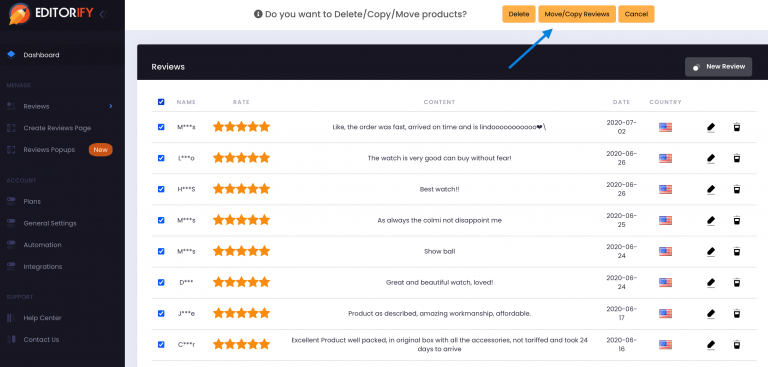
Select the reviews you want to copy and click "Move/copy reviews" at the top.
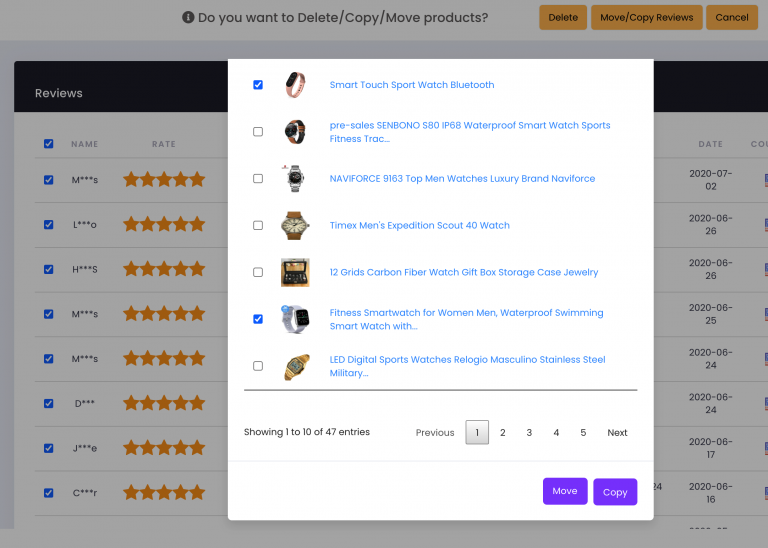
Select the product or products that should receive the reviews, then click "Copy" to keep them on the original product as well, or "Move" to take them off it.
Import reviews to several products at once
Open the supplier's product page you want to import reviews from.
Click the Editorify icon.
Select the reviews you want to import.
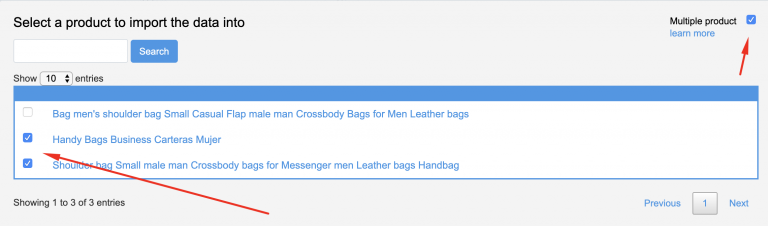
Turn on the "Multiple product" option and select the products that should receive the reviews.
Click the import button.
When this is useful
The same item is listed as several products in your store, for example one per colour.
You replaced a product and want its reviews on the new one (use Move).
FAQ
Can I change a review while copying it?
No. Reviews cannot be edited after import; you can hide or delete them. See How to delete or edit existing reviews?
What is the difference between Copy and Move?
Copy leaves the reviews on the original product and adds them to the ones you select. Move takes them off the original product.
Still stuck? Contact support or email support@editorify.com.