 Editorify
How to export reviews to CSV file?
On this page
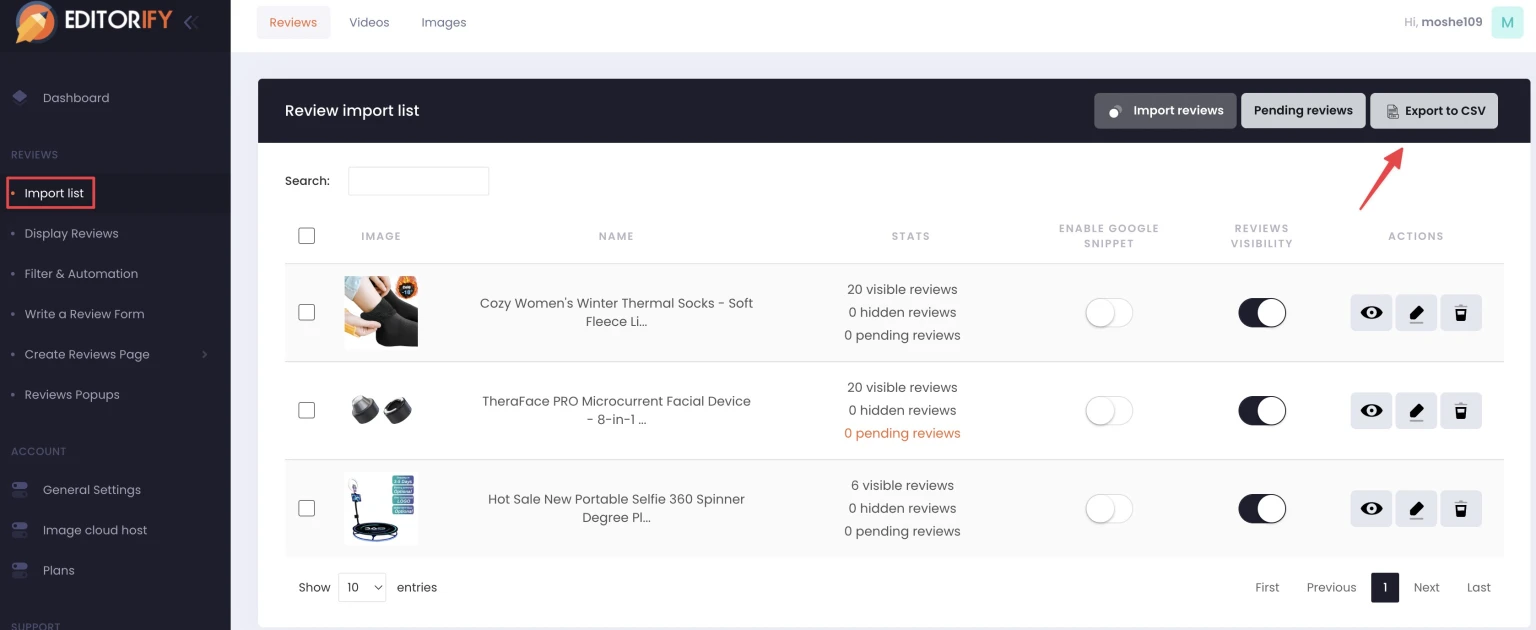
You can export your reviews to a CSV file from the Editorify dashboard. Open the "Import list" and click the Export icon; Editorify downloads your reviews as a CSV file that opens in Excel, Google Sheets or any spreadsheet app. Use it to keep a backup of your reviews or to look through them in a spreadsheet.
Export reviews to CSV
Click "Import list" in the side menu.
Click the Export icon.
When an export helps
Keep a copy of your reviews before you delete any of them.
Review or share your reviews in a spreadsheet, for example to check ratings across products.
FAQ
Can I edit reviews in the CSV and upload them back?
Reviews cannot be edited after import. You can hide a review or delete it. See How to delete or edit existing reviews.
Can I hide reviews instead of deleting them?
Yes. You can hide individual reviews, or hide every review that contains words you choose, such as a supplier name, with the keyword blacklist.
Still stuck? Contact support or email support@editorify.com.