 Editorify
How to show stars rating under the product title?
Show stars rating under the product title
On this page
To show the average star rating under the product title in Shopify, add one line of Editorify code to your theme. On product pages it goes below {{ product.title }} in the product template; on collection pages it goes below {{ product.title }} in the theme's product card snippet. Each takes a few minutes in the theme code editor.
Show stars under the title on product pages
In your Shopify admin, go to Online store, then Themes. Find the theme you want to edit and click Actions, then Edit code.
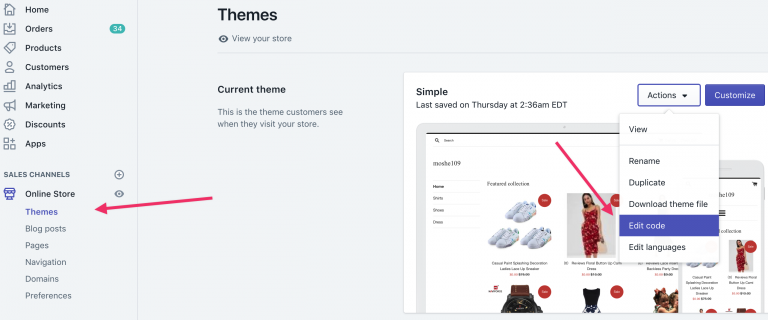
In the Sections folder, open product-template.liquid or product.liquid and search for:
{{ product.title }}Paste this code on the line below {{ product.title }} and save:
{% include 'editorify_widget', bellow_title:true %}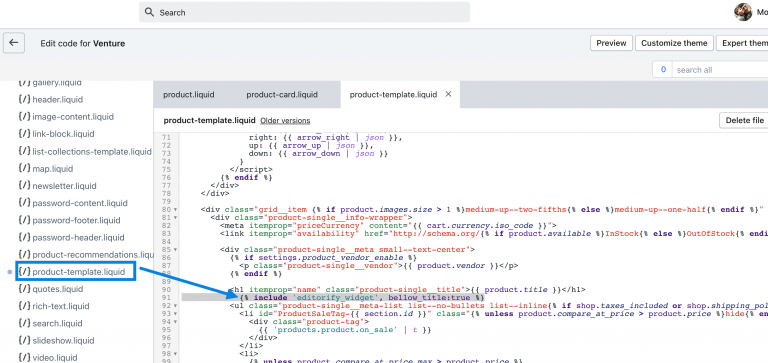
The result looks like this:

Show stars under the title on collection pages
In your Shopify admin, go to Online Store, then Themes. On your current theme click Actions, then Edit code.
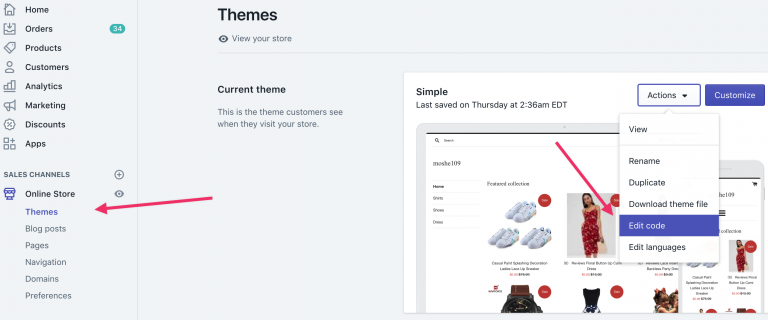
Find the snippet that renders each product in a collection. The file name depends on the theme: open product-card-grid.liquid, product-card.liquid, product-grid-item.liquid, product-thumbnail.liquid or product-info.liquid in the Snippets folder and search for:
{{ product.title }}Paste this code on the line below {{ product.title }} and save. Note that it uses
collection_page, notbellow_title:{% include 'editorify_widget', collection_page:true %}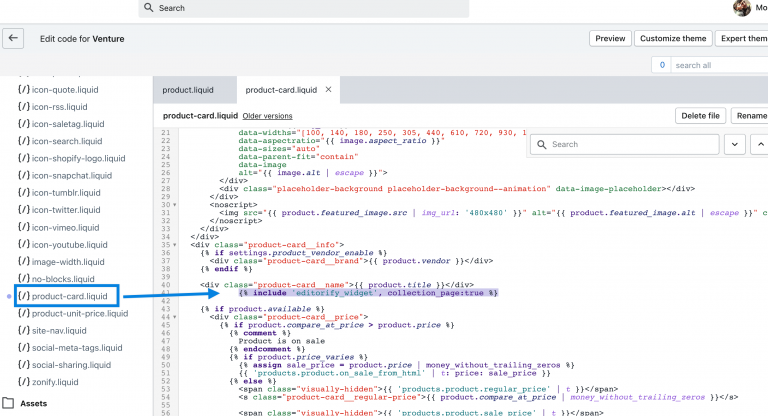
Related guides
Not comfortable editing theme code? Contact us and we will help you add it.
Still stuck? Contact support or email support@editorify.com.