 Editorify
How to import reviews and videos to my Woocommerce store?
On this page
To import reviews and videos to WooCommerce, install the Editorify WordPress plugin, connect your store, then open a supplier product page in Chrome, click the Editorify extension, mark the reviews you want and import them into a WooCommerce product. The Free plan imports AliExpress text reviews; Premium ($9.95/month) and higher add all 9 marketplaces, photos and videos.
Get started on WooCommerce
Register an account on Editorify for WooCommerce.
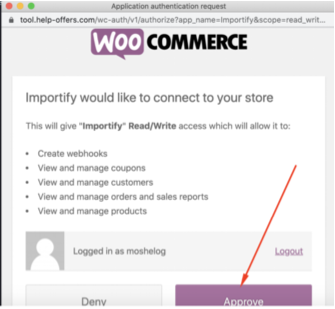
Install the Editorify plugin and approve the connection between Editorify and your WordPress website. Full steps: How to install and activate the Editorify plugin.
Choose a plan. The video below walks through your first import.
How to start using Editorify on Woocommerce?
Install the Editorify Chrome extension, open the supplier's product page, click the Editorify icon, mark the reviews, choose the WooCommerce product and click the import button.
Where you can import from
Editorify imports from exactly 9 marketplaces: AliExpress, Alibaba, Etsy, DHgate, Wish, Banggood, Walmart, 1688 and Taobao. Videos can also come from YouTube and Vimeo. Step-by-step WooCommerce guides:
The other marketplaces work the same way. See Which marketplaces and websites are supported?
Import reviews and videos from Alibaba
Subscribe to a paid plan.
Install the Editorify Chrome extension.
Open the Alibaba product page you want to import reviews from and click the Editorify icon.
Mark the reviews, choose the WooCommerce product and click the import button.
How to import Alibaba reviews and videos to WooCommerce
FAQ
Can I import videos on the Free plan?
No. The Free plan imports text reviews from AliExpress only (50 per store, up to 3 per product). Photo and video import start on Premium. See How to import videos to your store.
The extension cannot reach my store. What should I check?
Work through the WooCommerce store connection troubleshooting guide: security plugins, permalinks, SSL and PHP version.
Still stuck? Contact support or email support@editorify.com.